OpenCAMA IQ puts AI where it earns its keep: turning plain-English questions into safe queries, reading documents so people don't have to, and drafting configuration from a description. It assists the people in your office — it never quietly changes an assessment.
Type a question the way you'd ask a colleague, and get the right parcels back. The AI translates your language into a precise, validated query — it never invents data, and it never runs an unsafe operation against the database.
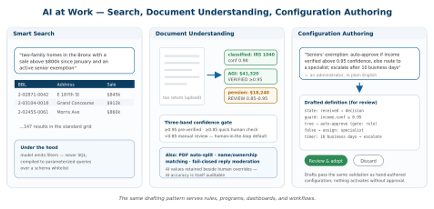
Deeds, income statements, identity documents and trust or LLC papers are classified and their key fields extracted in a single pass — each with a confidence score. Low-confidence items route to a person. Human-in-the-loop is the default, not an add-on.
The system recognizes the document type and pulls the fields that matter for that type, in one pass.
Each extracted value carries a score, so staff know where to look and what to trust.
Anything below your threshold is queued for review rather than written silently — by design.
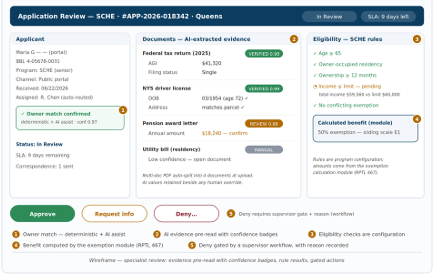
This is the part that changes how your office runs. Describe a business rule, an exemption program or a dashboard in plain English, and the platform drafts the definition for you to review, edit and approve. The work that used to need a vendor change request becomes a conversation.
Because OpenCAMA IQ is configured rather than coded, the same engine that runs your processes can be authored with AI assistance. You stay the author — the AI is a fast, knowledgeable draftsperson that never deploys anything on its own.
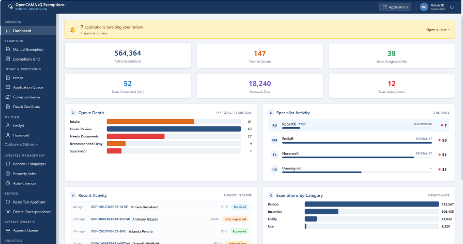
AI is powerful precisely because of the guardrails around it. Outputs are structured and validated, thresholds gate what proceeds automatically, and a person reviews anything that changes your data. The platform runs fully even with AI switched off.
AI is not a separate module you visit — it appears at the points where it saves real time, and stays out of the way everywhere else.
Plain-English questions become precise parcel queries for analysts and assessors. See CAMA core.
Documents are classified and key fields extracted, with low-confidence items sent to staff. See Exemptions.
Residents are guided through applications, with extraction reducing manual entry on your side.
Rules, programs and dashboards drafted from a description for your review. See the platform.
We are deliberate about where AI does and doesn't act. It drafts, extracts and searches; it surfaces work for people to decide. It does not change a value, approve an exemption or certify a roll on its own. Humans stay in control of every outcome that matters — and the platform works completely with AI turned off if your jurisdiction prefers.
Related: CAMA core · Exemptions · Platform overview.
We'll walk through plain-English search, document extraction and AI-assisted configuration on real assessment scenarios, and show exactly where a human stays in control.
Request a demo